


Cannot change label for "Full name" field | Community
Skip to main content

Cannot change label for "Full name" field

  • March 16, 2020
  • 1 reply
  • 0 views

I don't want customers to enter their "Full name" on the account creation page - but when I try to edit the label for "Full name" it is disabled.


I'm at a loss. I can't delete the field, I can't edit it. Am I FORCED to ask users for their FULL name? AND, even though "Display to customer" is NOT checked, it's displayed to customers, rather than the "First name" field I have (which IS required.)
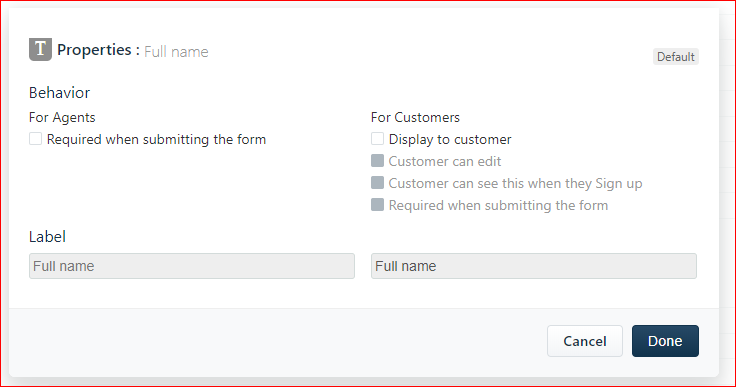

image


This topic has been closed for replies.

1 reply

Hello Dave,


You can make use of the following code to display the Full Name field as First Name. Navigate to Admin -> Portals -> Customize Portal -> Layout & Pages -> Portal Pages -> New user Sign up and paste the following code:

<script>

jQuery('label[for="user_name"]').text("First Name");

</script>


Note that since this involves Portal customization you need to be on Estate plan to make use of the aforementioned code.


That said, we don't have an option to change the Label name in the Portal and we'll take it up as a feedback.  


We appreciate your time in sharing the feedback.


Hope this helps! 


Cheers!